MuJoCo XLA (MJX)#
MuJoCo XLA (MJX) provides a JAX API for various implementations of MuJoCo. MJX can be found under the mjx directory in the MuJoCo repository.
MJX allows users to run MuJoCo on all compute hardware supported by the XLA compiler. A JAX re-implementation of MuJoCo (MJX-JAX) was added in version 3.0.0. MJX-JAX runs on: Nvidia and AMD GPUs, Apple Silicon, and Google Cloud TPUs. A Warp implementation of MuJoCo (MJX-Warp) was added in version 3.3.5 to optimize performance specifically for NVIDIA GPUs, resolving several performance bottlenecks exhibited in MJX-JAX.
MJX is distributed as a separate package called mujoco-mjx on PyPI.
It depends on the main mujoco package for model compilation and visualization, and also depends on
MuJoCo Warp for the Warp implementation of MuJoCo.
Installation#
The recommended way to install this package is via PyPI:
pip install mujoco-mjx
To use MuJoCo Warp with MJX, install via:
pip install mujoco-mjx[warp]
A copy of the MuJoCo library is provided as part of this package’s dependencies and does not need to be downloaded or installed separately.
Minimal example#
Once installed, you can use MJX by importing the mujoco.mjx package. A MuJoCo model is placed on device by calling mjx.put_model,
and a MuJoCo data is created on device with mjx.make_data. You can then step the simulation with mjx.step.
# Throw a ball at 100 different velocities.

import jax
import mujoco
from mujoco import mjx

XML=r"""
<mujoco>
  <worldbody>
    <body>
      <freejoint/>
      <geom size=".15" mass="1" type="sphere"/>
    </body>
  </worldbody>
</mujoco>
"""

model = mujoco.MjModel.from_xml_string(XML)
mjx_model = mjx.put_model(model)

@jax.vmap
def batched_step(vel):
  mjx_data = mjx.make_data(mjx_model)
  qvel = mjx_data.qvel.at[0].set(vel)
  mjx_data = mjx_data.replace(qvel=qvel)
  pos = mjx.step(mjx_model, mjx_data).qpos[0]
  return pos

vel = jax.numpy.arange(0.0, 1.0, 0.01)
pos = jax.jit(batched_step)(vel)
print(pos)
MJX Implementations#
MJX currently supports two implementations of MuJoCo: a pure JAX and a Warp implementation.
MJX-Warp#
MJX-Warp uses MuJoCo Warp, the most fully-featured implementation of MuJoCo for hardware accelerated devices. MJX-Warp resolves key performance bottlenecks exhibited in MJX-JAX around contacts and constraints.
Note that unlike MJX-JAX, MJX-Warp does not support automatic differentiation and has no immediate plans to support auto-diff.
Basic Usage#
We create model and data by passing impl='warp' to the mjx.put_model and mjx.make_data functions:
mj_model = mujoco.MjModel.from_xml_path(...)
model = mjx.put_model(mj_model, impl='warp')
data = mjx.make_data(mj_model, impl='warp', naconmax=naconmax, njmax=njmax)
Notice that we pass two extra arguments to mjx.make_data:
naconmaxdefines the maximum number of contacts for all worlds combined.njmaxdefines the maximum number of constraints per world. If you are developing a new scene, these parameters should be tuned by loading them in the viewer and increasing the values accordingly as overflows occur. Scalenaconmaxby the number of environments you’ll eventually need in ajax.vmap!
Contacts#
Since JAX and Warp diverge in their implementations of contact buffers, contacts were moved from
mjx.Data.contact to private mjx.Data._impl in MuJoCo 3.3.5. We encourage users to read out contacts solely through
contact sensors.
For more details and examples of using MJX-Warp in the wild, see the announcement in MuJoCo Playground here.
Graph Modes#
The mjx.put_model function accepts a graph_mode argument to configure the CUDA graph capture behavior,
exposed by the mjx.warp.GraphMode enum. When called from JAX, CUDA graphs are captured by the Warp
Foreign Function interface and are cached to help improve runtime performance. See the
Warp JAX interoperability documentation
for more details. The graph mode can be configured as follows:
import mujoco.mjx.warp as mjxw

model = mjx.put_model(mj_model, impl='warp', graph_mode=mjxw.GraphMode.WARP_STAGED)
The various graph modes have certain performance tradeoffs:
JAX: Does not work with MuJoCo Warp since the Warp implementation creates child graph nodes that cannot be rolled up into the XLA graph.WARP: (Default) Warp captures the CUDA graph internally and caches it using buffer pointers from XLA. JAX and XLA often optimize memory layouts in unexpected ways and may change buffer pointers between calls to Warp. Since Warp/CUDA require stable pointers, CUDA graphs will be re-captured if the input and output buffer pointers change. Graph captures are typically expensive to run, so excessive graph recaptures due to unstable pointers from JAX will degrade performance. If your JAX program is bottlenecked by excessive graph captures, considerWARP_STAGEDorWARP_STAGED_EX.WARP_STAGED: Staging buffers are created (thus increasing memory usage) and the XLA buffers are copied in and out of staging buffers so that the CUDA graph gets consistent memory pointers. A CUDA graph capture occurs only once.WARP_STAGED_EX: Similar toWARP_STAGEDbut the copy operations are moved outside the initial graph capture.
Depending on how your JAX program handles memory, you may want to use WARP_STAGED or WARP_STAGED_EX to avoid
excessive graph captures.
The following table shows an example of the tradeoff between different graph modes. We report Steps per Second (SPS) of different configurations on the Humanoid and Aloha Pot scenes. Notice that if we force a graph recapture on every step, there is a significant performance drop:
Configuration |
Humanoid |
Aloha Pot |
|---|---|---|
Pure Warp (No JAX FFI) |
3.35M |
2.45M |
JAX FFI ( |
2.96M |
2.33M |
JAX FFI ( |
0.80M |
0.65M |
To mitigate the recaptures, we can use WARP_STAGED or WARP_STAGED_EX. Since these modes introduce staging buffers,
they may exhibit lower performance than WARP, but they are significantly more performant than WARP if there are
excessive graph captures in the JAX-Warp FFI layer.
Configuration |
Humanoid |
Aloha Pot |
|---|---|---|
JAX FFI ( |
2.67M |
1.96M |
JAX FFI ( |
0.80M |
0.65M |
Batch Rendering#
MJX-Warp includes a hardware-accelerated batch renderer for generating pixel observations (such as RGB and depth) across multiple parallel environments.
To use the batch renderer, you must first create a render context that allocates the necessary buffers.
Note that the number of parallel worlds (nworld) is fixed when creating the context.
create_render_context returns a render context object that provides direct access to buffer
metadata (camera resolution, addresses, etc.). Call .pytree() to obtain the lightweight JAX
pytree that should be passed into jit/vmap-compiled functions:
from mujoco.mjx import create_render_context

rc = create_render_context(
    mjm=m,
    nworld=nworld,
    cam_res=(width, height),
    use_textures=True,
    use_shadows=True,
    render_rgb=[True] * ncam,
    render_depth=[False] * ncam,
    enabled_geom_groups=[0, 1, 2],
)
Hold a reference to rc for the lifetime of your program and pass rc.pytree() to
downstream JAX functions. The pytree is a lightweight handle that refers back to the
context via an internal registry.
Once the context is created, you can render images within a compiled JAX function. This involves updating the bounding volume hierarchy (BVH) and executing the raycaster:
from mujoco.mjx import get_rgb

@jax.jit
def render_fn(mx, d, rc_pytree):
    # 1. Update the BVH for the current scene state
    d = mjx.refit_bvh(mx, d, rc_pytree)

    # 2. Render all configured cameras
    pixels, _ = mjx.render(mx, d, rc_pytree)

    # 3. Extract the RGB tensor for the first camera (index 0)
    rgb = get_rgb(rc_pytree, 0, pixels)

    return rgb, d

rgb, d = render_fn(mx, d, rc.pytree())
Warning
The batch dimension nworld is fixed when the render context is created via
create_render_context() since the underlying Warp render context allocates
buffers for nworld environments that are not visible to JAX. render()
will always return outputs with a leading batch dimension of size nworld. Because of this,
there is a known issue where render() does not play nice with a
jax.vmap(jax.lax.scan).
Multi-GPU with pmap#
To render across multiple GPUs, create a render context per device by passing devices to
create_render_context.
ndevices = jax.local_device_count()
nworld_per_device = nworld // ndevices

# Create one render context for all devices
rc = create_render_context(
    mjm=m,
    nworld=nworld_per_device,
    devices=[f'cuda:{i}' for i in range(ndevices)],
    cam_res=(width, height),
)
Then use jax.pmap to parallelize the rendering across devices. See the complete example in
visualize_render.py.
MJX-JAX#
MJX-JAX is a re-implementation of MuJoCo that uses the same algorithms as the MuJoCo implementation. However, in order to properly leverage JAX, MJX deliberately diverges from the MuJoCo API in a few places (see below). For users looking for a simulator that is performant for small scenes and that roughly supports gradients, MJX-JAX is a good option. We point users to MJX-Warp otherwise.
MJX-JAX allows MuJoCo to run on all compute hardware supported by the XLA compiler via the JAX framework (AMD GPUs, Apple Silicon, and Google Cloud TPUs).
The MJX-JAX API is consistent with the main simulation functions in the MuJoCo API, although it is missing some features. While the API documentation is applicable to both libraries, we indicate features unsupported by MJX-JAX in the notes below.
MJX-JAX is a successor to the generalized physics pipeline
in Google’s Brax physics and reinforcement learning library. MJX-JAX was built
by core contributors to both MuJoCo and Brax. Brax
depends on the mujoco-mjx package, and Brax’s existing
generalized pipeline is no longer maintained.
Tutorial notebook#
The following IPython notebook demonstrates the use of MJX along with reinforcement learning to train humanoid and
quadruped robots to locomote:  .
.
In-depth usage#
Structs#
Before running MJX functions on an accelerator device, structs must be copied onto the device via the mjx.put_model
and mjx.put_data functions. Placing an mjModel on device yields an mjx.Model. Placing an mjData on
device yields an mjx.Data:
model = mujoco.MjModel.from_xml_string("...")
data = mujoco.MjData(model)
mjx_model = mjx.put_model(model)
mjx_data = mjx.put_data(model, data)
These MJX variants mirror their MuJoCo counterparts but have a few key differences:
mjx.Modelandmjx.Datacontain JAX arrays that are copied onto device.Some fields are missing from
mjx.Modelandmjx.Datafor features that are private to a specific implementation of MuJoCo, or that are unsupported.JAX arrays in
mjx.Modelandmjx.Datasupport adding batch dimensions. Batch dimensions are a natural way to express domain randomization (in the case ofmjx.Model) or high-throughput simulation for reinforcement learning (in the case ofmjx.Data).Numpy arrays in
mjx.Modelandmjx.Dataare structural fields that control the output of JIT compilation. Modifying these arrays will force JAX to recompile MJX functions. As an example,jnt_limitedis a numpy array passed by reference from mjModel, which determines if joint limit constraints should be applied. Ifjnt_limitedis modified, JAX will re-compile MJX functions. On the other hand,jnt_rangeis a JAX array that can be modified at runtime, and will only apply to joints with limits as specified by thejnt_limitedfield.
Neither mjx.Model nor mjx.Data are meant to be constructed manually. An mjx.Data may be created by calling
mjx.make_data, which mirrors the mj_makeData function in MuJoCo:
model = mujoco.MjModel.from_xml_string("...")
mjx_model = mjx.put_model(model)
mjx_data = mjx.make_data(model)
Using mjx.make_data may be preferable when constructing batched mjx.Data structures inside of a vmap.
Functions#
MuJoCo functions are exposed as MJX functions of the same name, but following PEP 8-compliant names. Most of the main simulation and some of
the sub-components for forward simulation are available from the top-level mjx module.
MJX functions are not JIT compiled by default – we leave it to the user to JIT MJX functions, or JIT their own functions that reference MJX functions. See the minimal example below.
Enums and constants#
MJX enums are available as mjx.EnumType.ENUM_VALUE, for example mjx.JointType.FREE. Enums for unsupported MJX
features are omitted from the MJX enum declaration. MJX declares no constants but references MuJoCo constants directly.
Helpful Command Line Scripts#
We provide two command line scripts with the mujoco-mjx package:
mjx-testspeed --mjcf=/PATH/TO/MJCF/ --base_path=.
This command takes in a path to an MJCF file along with optional arguments (use --help for more information)
and computes helpful metrics for performance tuning. The command will output, among other things, the total
simulation time, the total steps per second and the total realtime factor (here total is across all available
devices).
mjx-viewer --help
This command launches the MJX model in the simulate viewer, allowing you to visualize and interact with the model. Note this steps the simulation using MJX physics (not C MuJoCo) so it can be helpful for example for debugging solver parameters.
Feature Parity#
MJX supports most of the main simulation features of MuJoCo to be run on hardware accelerated devices. MJX will raise an exception if asked to copy to device an mjModel with field values referencing unsupported features.
The following table compares feature support between MJX-Warp and MJX-JAX compared to MuJoCo:
Category |
MJX-Warp |
MJX-JAX |
|---|---|---|
Dynamics |
||
Differentiability [1] |
✗ |
✓ |
All |
|
|
All |
|
|
All |
|
|
All |
|
|
All |
|
|
All |
|
|
All |
|
|
All |
|
|
All except |
|
|
All |
|
|
All |
1, 3, 4, 6 (1 is not supported with |
|
All except |
|
|
Fluid Model |
All |
Inertia model only |
All |
|
|
All |
||
All except |
See notes below [2] |
|
Flex |
|
Not supported. |
Mass matrix format |
Sparse and Dense |
Sparse and Dense |
Jacobian format |
|
|
Lights |
✓ |
Positions and directions |
Ray |
All, BVH for meshes, hfield, and flex |
Slow for meshes, hfield and flex unimplemented |
Performance Tuning#
MJX-Warp#
MJX-Warp mitigates performance issues around scaling the number of contacts and constraints from MJX-JAX. MJX-Warp also fully supports mesh collisions. See the section on MuJoCo Warp performance tuning here.
MJX-JAX#
Note
MJX-Warp mitigates many of the performance issues with MJX-JAX!
For MJX-JAX to perform well, some configuration parameters should be adjusted from their default MuJoCo values:
- option/iterations and option/ls_iterations
The iterations and ls_iterations attributes—which control solver and linesearch iterations, respectively—should be brought down to just low enough that the simulation remains stable. Accurate solver forces are not so important in reinforcement learning in which domain randomization is often used to add noise to physics for sim-to-real. The
NEWTONSolver delivers excellent convergence with very few (often just one) solver iterations, and performs well on GPU.CGis currently a better choice for TPU.- contact/pair
Consider explicitly marking geoms for collision detection to reduce the number of contacts that MJX-JAX must consider during each step. Enabling only an explicit list of valid contacts can have a dramatic effect on simulation performance in MJX-JAX. Doing this well often requires an understanding of the task – for example, the OpenAI Gym Humanoid task resets when the humanoid starts to fall, so full contact with the floor is not needed.
- maxhullvert
Set maxhullvert to
64or less for better convex mesh collision performance.- option/flag/eulerdamp
Disabling
eulerdampcan help performance and is often not needed for stability. Read the Numerical Integration section for details regarding the semantics of this flag.- option/jacobian
Explicitly setting “dense” or “sparse” may speed up simulation depending on your device. Modern TPUs have specialized hardware for rapidly operating over sparse matrices, whereas GPUs tend to be faster with dense matrices as long as they fit onto the device. As such, the behavior in MJX-JAX for the default “auto” setting is sparse if
nv >= 60(60 or more degrees of freedom), or if MJX-JAX detects a TPU as the default backend, otherwise “dense”. For TPU, using “sparse” with the Newton solver can speed up simulation by 2x to 3x. For GPU, choosing “dense” may impart a more modest speedup of 10% to 20%, as long as the dense matrices can fit on the device.- Broadphase
While MuJoCo handles broadphase culling out of the box, MJX-JAX requires additional parameters. For an approximate version of broadphase, use the experimental custom numeric parameters
max_contact_pointsandmax_geom_pairs.max_contact_pointscaps the number of contact points sent to the solver for each condim type.max_geom_pairscaps the total number of geom-pairs sent to respective collision functions for each geom-type pair. As an example, the shadow hand environment makes use of these parameters.
GPU performance#
The following environment variables should be set:
XLA_FLAGS=--xla_gpu_triton_gemm_any=trueThis enables the Triton-based GEMM (matmul) emitter for any GEMM that it supports. This can yield a 30% speedup on NVIDIA GPUs. If you have multiple GPUs, you may also benefit from enabling flags related to communication between GPUs.
🔪 MJX-JAX - The Sharp Bits 🔪#
Note
MJX-Warp mitigates many of the sharp bits of MJX-JAX!
GPUs and TPUs have unique performance tradeoffs that MJX-JAX is subject to. MJX-JAX specializes in simulating big batches of parallel identical physics scenes using algorithms that can be efficiently vectorized on SIMD hardware. This specialization is useful for machine learning workloads such as reinforcement learning that require massive data throughput.
There are certain workflows that MJX-JAX is ill-suited for (that MJX-Warp entirely mitigates):
- Single scene simulation
Simulating a single scene (1 instance of mjData), MJX-JAX can be 10x slower than MuJoCo, which has been carefully optimized for CPU. MJX-JAX works best when simulating thousands or tens of thousands of scenes in parallel.
- Collisions between large meshes
MJX-JAX supports collisions between convex mesh geometries. However the convex collision algorithms in MJX-JAX are implemented differently than in MuJoCo. MJX-JAX uses a branchless version of the Separating Axis Test (SAT) to determine if geometries are colliding with convex meshes, while MuJoCo uses either MPR or GJK/EPA, see Collision Detection for more details. SAT works well for smaller meshes but suffers in both runtime and memory for larger meshes.
For collisions with convex meshes and primitives, the convex decomposition of the mesh should have roughly 200 vertices or less for reasonable performance. For convex-convex collisions, the convex mesh should have roughly fewer than 32 vertices. We recommend using maxhullvert in the MuJoCo compiler to achieve desired convex mesh properties. With careful tuning, MJX-JAX can simulate scenes with mesh collisions – see the MJX-JAX shadow hand config for an example. Speeding up mesh collision detection is an active area of development for MJX-JAX.
- Large, complex scenes with many contacts
Accelerators exhibit poor performance for branching code. Branching is used in broad-phase collision detection, when identifying potential collisions between large numbers of bodies in a scene. MJX-JAX ships with a simple branchless broad-phase algorithm (see performance tuning) but it is not as powerful as the one in MuJoCo.
To see how this affects simulation, let us consider a physics scene with increasing numbers of humanoid bodies, varied from 1 to 10. We simulate this scene using CPU MuJoCo on an Apple M3 Max and a 64-core AMD 3995WX and time it using testspeed, using
2 x numcorethreads. We time the MJX-JAX simulation on an Nvidia A100 GPU using a batch size of 8192 and an 8-chip v5 TPU machine using a batch size of 16384. Note the vertical scale is logarithmic.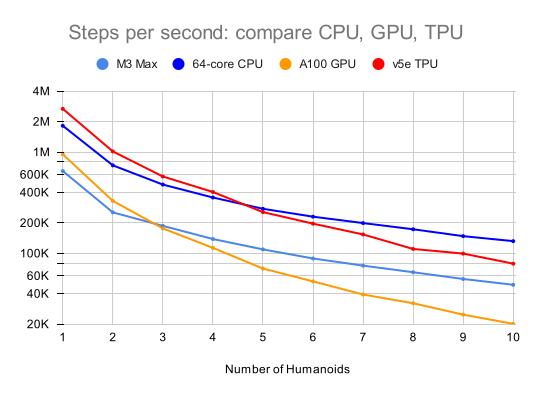
The values for a single humanoid (leftmost datapoints) for the four timed architectures are 650K, 1.8M, 950K and 2.7M steps per second, respectively. Note that as we increase the number of humanoids (which increases the number of potential contacts in a scene), MJX-JAX throughput decreases more rapidly than MuJoCo.